
Make images from a link with a dynamic URL
Turn on a template's dynamic URL, change the words in the link to get a new image or PDF, and keep costs safe with a credit cap, a cache and an expiry date.
A dynamic URL is a public link that makes an image or PDF from a template. The values after the ?
fill in the template’s keys. Change them, and you get a new image. You need no code and no API key, so
you can put the link straight into a web page, an email or a social preview.
https://api.jamframe.com/r/d/Q2x5a1RqZmVt0GZ4aWw.png?headline=Summer%20sale&price=19Turn on the dynamic URL
- Open the template’s Integrations, API & Forms dialog: click it in the editor’s top bar, or click Integrations on a template card.
- Click the Dynamic URL tab.
- Check the settings. A new link starts with a credit cap of 100 credits.
- Tick Enable dynamic URL.
The link and its usage now show under Link. Each template has one dynamic URL.
Only people with editor access can turn the link on, change it or see it. People with view-only access see the settings and the usage, but not the link, because anyone who has the link can spend the workspace’s credits.
Next to Enable dynamic URL a badge shows the link’s status:
| Status | What it means |
|---|---|
| Live | The link works. |
| Off | The link is turned off. It answers with an error. |
| Expired | The expiry date has passed. |
| Credit cap reached | The link has used its credit cap. Images already in the cache still work; new values don’t. |
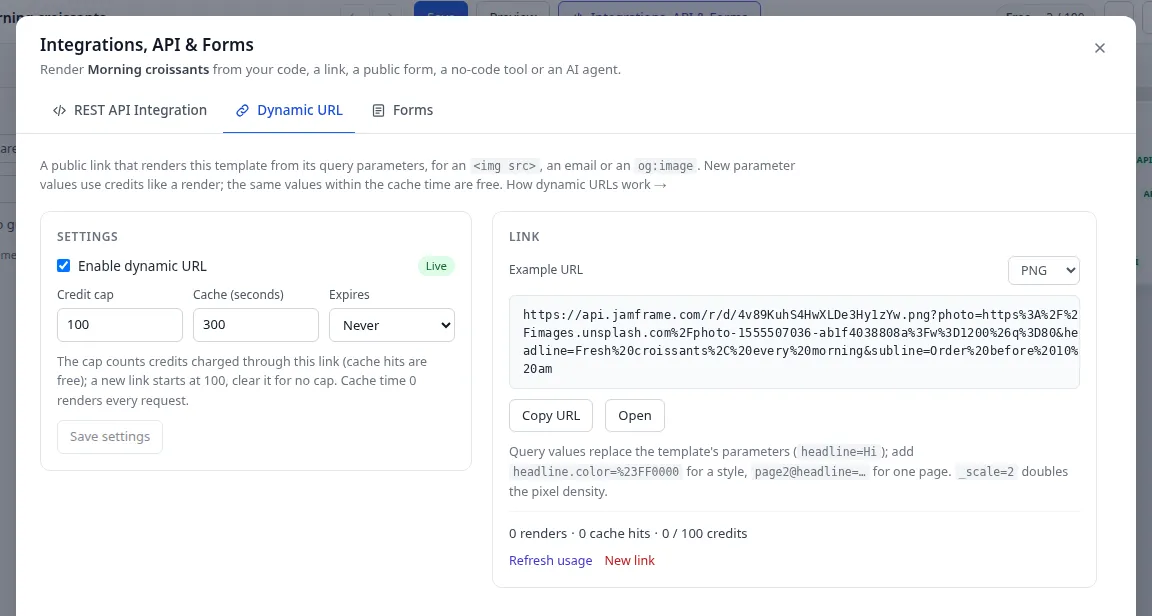
Settings
| Setting | Default | What it does |
|---|---|---|
| Credit cap | 100 for a new link | The most credits this link can use. Leave it empty for no cap. Images served from the cache don’t count. |
| Cache (seconds) | 300 (5 minutes) | How long the same values give back the stored file, for free. 0 renders every request. The most is 2,592,000 (30 days). |
| Expires | Never | In 1 hour, In 1 day, In 7 days, In 30 days, In 90 days, In 1 year or Never, counted from when you save. Once set, the list shows the date. |
After you change a setting, click Save settings.
The credit cap protects you if the link leaks: nobody can spend more than the cap through it. Your workspace’s own credits still apply on top.
Get the link
Example URL shows the link filled in with the template’s current values.
- Choose a format in the list next to Example URL: PNG, JPEG, WebP or PDF. The end of the link
changes to
.png,.jpg,.webpor.pdf. - Click Copy URL to copy it, or Open to open it in a new tab.
Open really renders the link, so it uses credits unless the image is already in the cache.
For an image, the example uses the values on page 1. For a PDF, it uses every page.
Change the values in the link
Each key=value pair after the ? sets one key, the same way modifications do in the API. Put &
between pairs.
| You write | What it does |
|---|---|
headline=Summer%20sale |
Sets the key headline to “Summer sale”. |
headline.color=%23FF0000 |
Changes a style of the layer, here its color to red. |
page2@headline=Last%20day |
Sets headline on page 2 only. |
Encode special characters in values: a space is %20 or +, # is %23 and & is %26. In a
spreadsheet, the ENCODEURL function does this for you.
Keys that match nothing in the template are ignored. So tracking tags such as utm_source don’t change
the image or cost a render. For every key and style you can send, see
Modifications.
Special parameters
Names that start with _ set render options:
| Parameter | Values | What it does |
|---|---|---|
_page |
A page number, from 1. For a PDF, a list such as 1,3. |
The page an image shows (page 1 if you leave it out), or the pages a PDF holds (every page if you leave it out). |
_scale |
1, 2 or 3 |
Pixel density. 2 makes the image twice as wide and twice as tall. |
_size |
A size id, a size name or WIDTHxHEIGHT |
Makes the template in another size. See Smart Resize. |
Other names that start with _ are ignored.
Limits
- At most 50 parameters in one link.
- A name can be up to 200 characters, and a value up to 2,000.
- The whole part after the
?can be up to 8,000 characters. - The same name twice is an error.
- An image, or each page of a PDF, can be at most 20 megapixels: width × height ×
_scale². A 1080 × 1920 story at_scale=3fits.
Credits and the cache
- New values render. Each new set of values uses 1 credit per image, or per PDF page. It counts toward the link’s credit cap.
- The same values are free for a while. Within the cache time, the same values give back the stored file. Cache hits cost nothing, don’t count toward the cap, and still work after the cap is reached.
- Saving the template shows the new design. The next request after you save renders again. A browser or another cache in between may keep showing an older copy for up to an hour.
- Failed renders are free.
- AI doesn’t run on a dynamic URL. AI layers show their saved content, and translation isn’t available. To fill AI layers at render time, use the API. See AI at render time.
Watch usage and control the link
Under Link, one line shows the link’s renders, cache hits, the credits it used (out of the cap) and any failed renders. Below it you see when the link was last used.
- Refresh usage loads the latest numbers.
- Reset credit count sets the credits used back to 0, so the cap starts again. It shows once the link has used credits.
- New link makes a new link. The old link stops working at once, so update every page and email that uses it.
- To pause the link, untick Enable dynamic URL. Tick it again later to bring back the same link.
When you turn a link off or make a new one, new requests stop at once. A browser or another cache in between may still show a copy it already has, for up to an hour.
Use the link
On a web page
Use the link as the src of an <img> tag:
<img
  src="https://api.jamframe.com/r/d/Q2x5a1RqZmVt0GZ4aWw.png?headline=Welcome%20back"
  alt="Welcome back"
  width="1080"
  height="1080"
/>
In an email
Put your email tool’s merge tags into the link, so each person gets an image with their own details. The tag style depends on your email tool, for example:
https://api.jamframe.com/r/d/Q2x5a1RqZmVt0GZ4aWw.png?name={{first_name}}Each different value is one render. Set the credit cap to at least the number of people you send to, or clear it. People who share the same values get the cached image for free.
As a social preview image
Use the link in your page’s og:image tag. Social networks then show the image when someone shares the
page:
<meta
  property="og:image"
  content="https://api.jamframe.com/r/d/Q2x5a1RqZmVt0GZ4aWw.png?title=How%20to%20bake%20bread"
/>
Errors
When a link can’t make an image, it answers with a short JSON error instead of an image, for example
{"error": "URL_EXPIRED", "message": "This link has expired."}. On a web page, the image then shows as
broken.
| Status | error |
Why |
|---|---|---|
| 400 | INVALID_PARAMETERS |
A parameter is wrong, an image URL isn’t a public http(s) address, or the image would be over 20 megapixels. |
| 402 | CREDIT_CAP_REACHED |
The link used its credit cap. Raise the cap, or click Reset credit count. |
| 402 | CREDITS_EXHAUSTED |
Your organization is out of render credits, or the workspace reached its credit cap. |
| 403 | UNAVAILABLE |
Your organization is on hold or suspended. |
| 404 | NOT_FOUND |
The link is wrong, was replaced with New link, or the template was deleted. |
| 410 | URL_EXPIRED |
The expiry date has passed. |
| 410 | URL_DISABLED |
The link is turned off. |
| 422 | MEDIA_UNAVAILABLE |
An image in the template or the link could not be loaded, for example because its server didn’t answer within 10 seconds. |
| 429 | RATE_LIMITED |
Too many requests, or renders of this link keep failing and it is paused for a while. |
| 500 | RENDER_FAILED |
The render failed. |
| 503 | BUSY |
Too many renders are running. Try again in a few seconds. |
A dynamic URL has its own limits per minute, for each visitor, link and workspace. See Public links and forms.
Dynamic URL or signed URL?
Anyone who has a dynamic URL can change any value in it. When people must not change the values, such as a certificate with a person’s name, use a signed URL instead. To compare the two, see Signed URLs or dynamic URLs?
What next
- Try values before you share the link: Test render.
- Let people fill in a page instead of editing a link: Forms.
- See every render a link made: Renders.
- The full contract of
GET /r/d/…: API reference (opens in a new tab).
Last updated
Still stuck?
Email [email protected] and a real person will reply. Tell us the template you were using and what you expected to happen.